
Download CandideAI – AI Education Platform for Kids, Free & Secure
Overview
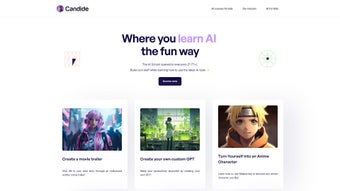
CandideAI is a web‑based learning environment built especially for children aged 4‑17 who want to explore artificial intelligence in a safe, playful setting. Rather than presenting dry theory, the platform wraps AI concepts inside storytelling adventures, visual creators, and real‑world challenges. Young learners start with simple drag‑and‑drop tools that let them add AI‑enhanced effects to pictures, while older students can design AI‑generated movie trailers, build a ChatGPT‑powered vacation planner, or even program a virtual Pokémon creator.
Every module is delivered through high‑quality video lessons that break complex ideas into bite‑size explanations, followed by guided hands‑on projects and reflective discussions. The curriculum is organized into age‑appropriate learning paths, ensuring that a four‑year‑old never feels overwhelmed and a teenager is constantly challenged. Lifetime access means that once a family signs up, they can revisit any lesson at any time, fostering continuous reinforcement of skills.
Parents appreciate the platform’s focus on privacy: all data is encrypted, and the system complies with GDPR and COPPA. A free introductory course offers a risk‑free glimpse, while a modest subscription unlocks the full library of interactive courses. In short, CandideAI democratizes AI education, turning curiosity into confidence and preparing the next generation for a world where AI literacy will be as fundamental as reading and math.
Key Features & Learning Paths
- Interactive AI‑driven movie‑trailer creator (ages 12‑17)
- AI‑generated wall art and infinite coloring books (ages 8‑14)
- ChatGPT‑powered family trip planner (ages 10‑16)
- Personalized Pokémon character designer using generative models
- Step‑by‑step video lessons hosted on a secure cloud platform
- Lifetime access to current and future courses
- Progress‑tracking dashboard for kids and parents
- Gamified quizzes and badge system to reinforce learning
- Dedicated community forum moderated by educators
- Parental control panel with privacy‑first settings
The platform’s feature set is deliberately varied to align with developmental milestones. For the youngest group (4‑7), the interface offers colorful AI‑enhanced photo filters and simple fill‑in‑the‑blank activities that teach pattern recognition without any text‑heavy instructions. Middle‑age learners (8‑12) gain access to AI‑generated artwork tools and basic storytelling generators, allowing them to see immediate results from their inputs.
Teenagers (13‑17) tackle more sophisticated projects such as scripting AI‑driven video content, training miniature machine‑learning models, and automating YouTube playlists. Each course follows a consistent four‑step framework: concept overview, guided project, reflective discussion, and a showcase where children can proudly display their creations. The badge system awards digital trophies for milestones like “First AI Model” or “Creative Storyteller,” fostering intrinsic motivation.
Meanwhile, the community forum encourages peer‑to‑peer feedback under the watchful eye of certified educators, creating a supportive learning ecosystem that most generic coding platforms lack. This blend of interactive content, progress analytics, and safe social interaction makes CandideAI a comprehensive AI education solution.
Installation, Usage & Compatibility
CandideAI operates entirely in the browser, eliminating the need for any local installation or heavy downloads. Users simply visit candideai.com on a modern browser—Chrome, Firefox, Safari, or Edge—and sign in with a parent‑created account. The responsive design adapts fluidly to desktops, laptops, and tablets, delivering a consistent experience on Windows 10/11, macOS Monterey and later, Chrome OS, iPadOS, and Android tablets.
Because all AI processing runs on secure cloud servers via WebAssembly and API calls, devices only need a stable internet connection and a modest amount of RAM; there is no requirement for dedicated graphics cards or local AI libraries. After logging in, caregivers can generate child profiles, assign age‑appropriate courses, and set daily usage limits. The dashboard then presents a clear “Start Course” button for each module, with video lessons streaming at adaptive bitrates to prevent buffering on slower connections.
All user data—including progress metrics, badge collections, and personal settings—is encrypted in transit (TLS) and at rest, meeting GDPR and COPPA standards. Curriculum updates are pushed instantly, so learners always have the newest content without manual patches. In essence, CandideAI provides a frictionless, secure, and universally compatible environment that lets kids focus on creation rather than technical setup.
Compatible Operating Systems: Windows 10/11, macOS Monterey+, Chrome OS, iPadOS, Android 8.0+, and any Linux distribution with a modern web browser.
Pros & Cons
Pros
- Project‑based learning makes abstract AI concepts tangible.
- Age‑segmented curriculum ensures relevance from early childhood to teens.
- Web‑based delivery removes installation hurdles and works on all major OS.
- Lifetime access offers long‑term value and encourages revisiting material.
- Strong privacy controls comply with GDPR and COPPA.
- Gamified badges and moderated community boost motivation and safe interaction.
Cons
- Requires a reliable internet connection for video streaming and AI processing.
- Advanced projects may need additional parental guidance for younger users.
- Full library is behind a subscription; the free tier is limited to a single sample course.
- No offline mode; unavailable on devices without internet access.
Frequently Asked Questions
Is CandideAI free or paid?
CandideAI provides a free introductory module that lets families sample the experience. Unlimited access to the full course library requires a monthly or annual subscription, which includes lifetime updates.
Do I need any prior coding experience?
No. Every lesson is designed for beginners. Visual tools abstract traditional code, allowing children to focus on concepts and creativity.
What devices can I use to access CandideAI?
Any device with a modern web browser—desktop computers (Windows, macOS, Linux), laptops, tablets (iPadOS, Android), and Chrome OS devices—all work seamlessly.
How does CandideAI protect my child's privacy?
All personal data is encrypted in transit (TLS) and at rest. The platform adheres to GDPR and COPPA, and parents control data‑sharing settings through a dedicated dashboard.
Can I track my child's progress?
Yes. The dashboard shows real‑time progress indicators, badge collections, quiz scores, and weekly email summaries for parents.
Conclusion – Why You Should Download CandideAI Today
In a world where AI shapes every industry, early exposure is no longer a luxury—it’s a necessity. CandideAI delivers that exposure through a secure, engaging, and curriculum‑driven platform that transforms complex ideas into creative projects children love. The combination of lifetime access, cross‑device compatibility, strong privacy safeguards, and a gamified learning path makes it an attractive investment for forward‑thinking parents and educators.
Whether you aim to spark a four‑year‑old’s curiosity or equip a high‑schooler with future‑proof skills, CandideAI scales with the learner’s age and ambition. Start with the free trial to experience the interactive lessons, then consider the subscription as a long‑term commitment to your child’s digital fluency. Click the link below, download CandideAI, and watch imagination turn into AI‑powered reality.
CandideAI stands out for its ability to make advanced AI concepts approachable for kids. The platform’s interactive projects and secure web‑based delivery are major strengths. While an internet connection is required, the educational payoff far outweighs this limitation. Overall, it earns a solid 4.5 out of 5 stars.



.png)



